 realtime data
is a comprehensive yet simple data warehousing and web browser based
data mining system. It provides easy to operate sales history analysis
and detailed "drill-down" through the data in multiple paths and
dimensions. realtime data
is a comprehensive yet simple data warehousing and web browser based
data mining system. It provides easy to operate sales history analysis
and detailed "drill-down" through the data in multiple paths and
dimensions.An online demonstration of this software is available here. The software also produces graphical analysis and year to year sales comparison. Trend or pie charts are generated in realtime. This demonstration system includes two years of sales history which is typical of a medium size business with a large inventory and customer base, and a high volume of turnover. The data may be searched and grouped by one or more of any of the following criteria; 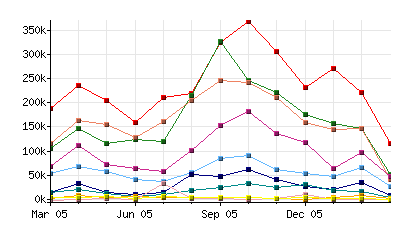
|
Benefits?
Many companies spend
endless
hours manually compiling data from their ERP system, typically into MS
Excel spreadsheets, and then manually distributing this data to all
interested parties. The consequence is that the data is already out of
date when it is received.
realtime data,
as
the
name
implies, provides the data in realtime. It
is also accessible to any of your staff who has access to a web
browser, anywhere in the world.
The user chooses the
report
parameters and has the tools to analyse those
results to a great level of detail.
Additional modules provide security and access control. Users or groups of users may be limited to specific subsets of data, or restricted from accessing particular modules altogether. |
|
Will
it work with my
ERP system?
realtime data
has been successfully
implemented on a variety of MRP and ERP
systems including;
The same data is then available from realtime data to any other application by means of ODBC. |
 Searching for
information Searching for
informationThe data mining controls allow you to analyse the sales history over a selected period. In the demonstration system, this may be either the last 12 months, the current financial year, or a specific month range. The results will be reported and grouped according to the "Report on" control, and may be further refined by selecting a particular item (e.g. sales person) or by entering a specific search string. The controls also provide two further levels of data grouping, which could allow you, for example, to identify the the monthly sales to a specific customer or the range of products purchased by that customer. And the results will provide totals and sub-totals for each data group.  Navigating
through the data Navigating
through the dataThe software quickly produces the results of your analysis which may contain many thousands of items (records), but in general you will only be interested in the items which appear at the top of the results. So only the first 100, or whatever number you chose in the settings, are displayed and the total number of results is summarised at the left of the page with simple buttons which allow you to navigate forwards and backwards through the rest of the results. And the same results which are displayed on the screen may be downloaded at any time to a MS Excel spreadsheet by simply clicking on the "Download" button. |
 Sorting the results Sorting the resultsThe search results are provided in tabular format with columns and subtotals for each data group, plus a grand total at the top of the page. The results will ordinarily be sorted by the search criteria, e.g. the customer names. This is identified by the arrow on the button, which also indicates the sort order (ascending or descending). Important data can be quickly revealed by clicking on one of the buttons at the top of the columns. Most significantly, clicking on the "Net sales" column will sort the results by "Net sales" in descending order, thereby quickly identifying the customer who contributed the greatest net sales during the chosen period. |
|